How to Pay for Your iCloud and Google Storage Using Squareme
Missing a subscription in 2025 is akin to death.
Why? Because subscriptions keep us connected to the rest of the world and to services that make life smoother, like iCloud, Google One, GenAI, YouTube, and many others. These services keep our photos safe, projects organised, research smarter, and digital storage cleaner.
Here’s the problem: paying for them with the traditional naira debit cards feels like the Gulder Ultimate Search. It’s a tough and unyielding process. The feedback is either “Card declined”, “Payment failed”, or “Try again later”. The story spins off into worse conclusions in most cases.
In this guide, we’ll walk you through why payments fail, how virtual cards fix it, and how you can use Squareme to pay for Apple and Google storage without the stress.
Why Apple and Google Storage Payments Fail in Nigeria
If you’ve ever had trouble paying for Apple or Google storage in Nigeria, you’re not alone. It is not a new problem. The FX/cross-border infrastructure has always been neatly intricate – a reality that many traditional banks grapple with.
Here are some reasons why the current payment structures keep failing:.
- Tokenised Payments: Apple and Google use tokenised billing for security. Many local cards just can’t handle it, which means declines happen a lot.
- Fraud & Security Flags: Banks often block recurring payments automatically, flagging them as suspicious.
- Exchange Rate Instability: Scarce USD and fluctuating rates can stop payments even when you have enough Naira in your account.
- Recurring Billing Requirements: Apple and Google expect valid USD-backed cards for auto-renewals, and most local cards can’t reliably provide that.
The Magic of Virtual USD Cards
Paying for Apple or Google storage from Nigeria can be a real headache. Limits on local cards, random declines, and tokenisation issues make what should be a simple subscription feel like a full-time job. That’s where virtual USD cards come in. Funded directly in dollars, they can handle:
- Tokenized billing (Apple, Google, Netflix, and more)
- Recurring subscriptions without interruptions
- Payments across platforms like iCloud, Google One, Spotify, Canva, ChatGPT, you name it
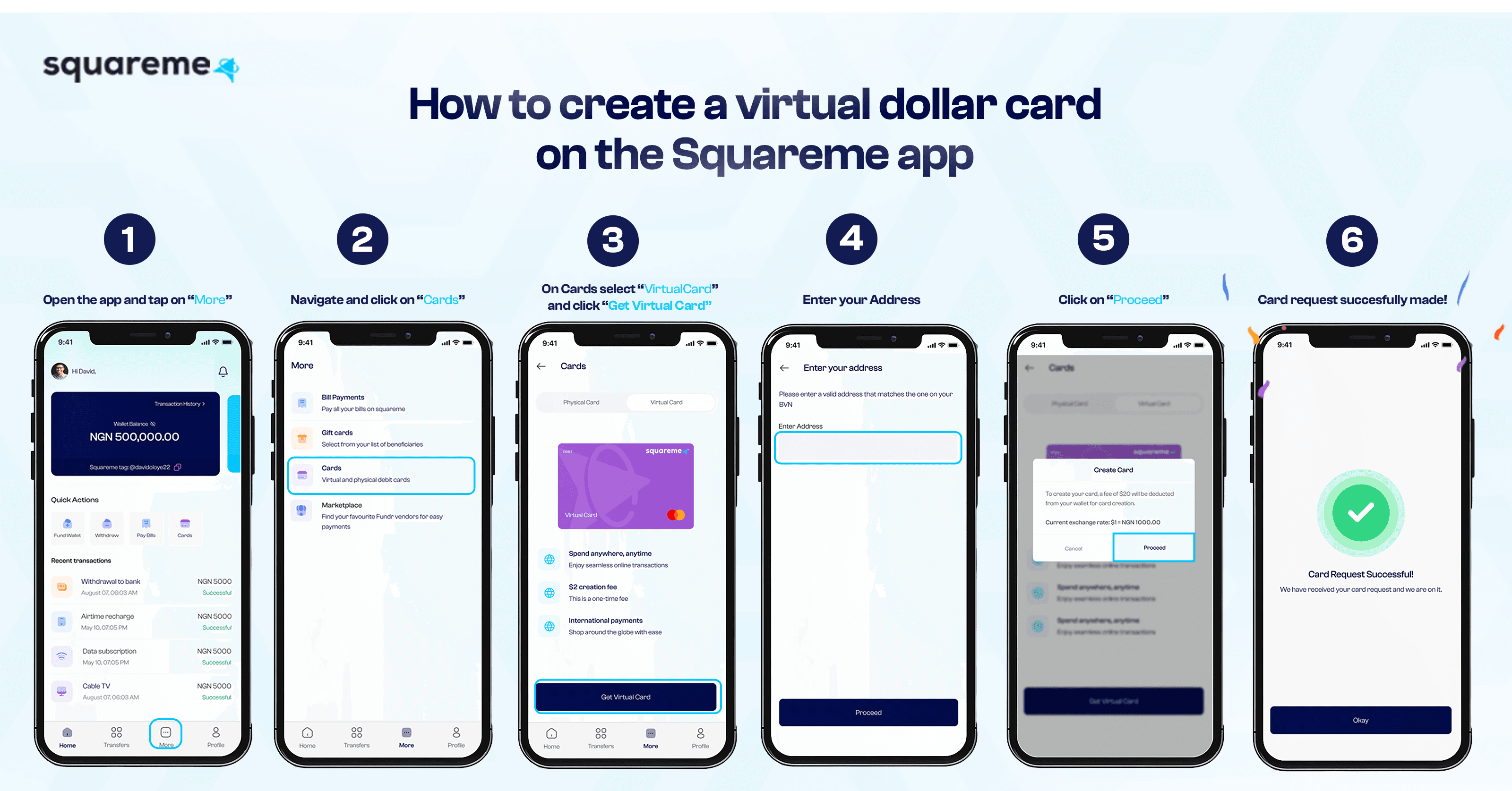
Virtual USD cards like Squareme’s help make life a little easier. They’re fast, reliable, and credible. And the best part? Setting up a virtual dollar card takes less than two minutes at Squareme. We’ve laid out the steps below, and they include:
How To Set Up Your Squareme Virtual USD Card
- Open the Squareme app.
- KYC Verification: After opening an account on the Squareme app, you will be prompted to upload your NIN and BVN. This helps us keep your accounts safe and unlocks higher spending limits.
- Fund your wallet: After completing the KYC process and uploading the required documents, the next step is to fund your account. You can fund your wallet by either transferring from any Nigerian bank or by sharing your Squareme tag with fellow Squareme users.
- Once your wallet has money, you can create your virtual USD card. Open the “Cards” section in the app and tap “Create USD Card”. (Always have a bit more for charges.)
- With this, your virtual USD card has been created. All that’s left is to move money from your wallet to your card, and boom, you can start using your card.
How to Pay for Apple Storage Using Squareme
With Squareme, paying for your Apple storage isn’t a drag anymore, and the steps are so easy. For this transaction, you’ll need a Squareme virtual dollar card, enough $USD on your card, and your Apple ID signed in. When you ensure everything is in place, you just have to follow the steps below:
- Open your app store
- Click on your profile at the top right, then click your name/email
- Tap Country/Region
- Select your new country or region
- Tap Change Country or Region.
- Tap your new country or region, then review the Terms & Conditions.
- Tap Agree in the upper-right corner, then tap Agree again to confirm.
- There will be a screen to include your payment method. Enter your Squareme virtual card information in the fields shown
How to Pay for Google Storage Using Squareme
As it was paying for your Apple storage, you’ll need to ensure that you have your Squareme virtual dollar card in place and funded with enough $USD for your subscription and a little more in case of extra charges such as transaction fees or Remita charges, and your Google account is signed in. When you ensure everything is in place, you just have to follow the steps below:
- Open Google Play Store
- Profile: Click on 'profile' located on the top right
- Payments & Subscriptions: This is the third option you’d see after opening the profile
- Add Credit/Debit Card: After clicking on ‘Payments and subscriptions’, click on “Payment Methods”, which is the first option on the page
- Enter your SquareMe card details.
- Open the Google One app: when opened, click on the menu button on the top left and select “Membership Plans”.
- Pick your storage plan (100GB, 200GB, or 2TB).
- Confirm your payment.
Commonly Asked Questions
Q1. Why was my virtual card payment declined?
A: Payment declines usually occur due to insufficient balance. To avoid this, it is recommended to keep an extra $1–$5 available on your card at all times.
Q2. What should I do if Apple rejects my virtual card ?
A: Apple may occasionally reject a card. In such cases, try switching your billing address or logging out of your Apple account and then logging back in. These steps typically resolve the issue.
Q3. Why is Google asking for additional verification?
A: Google may request extra verification to confirm your payment details. Ensure that the name on your Squareme card matches the name on your Google account to prevent verification issues.
Q4. What if my subscription payment still doesn’t go through?
A: If a subscription payment does not go through, remove any old cards from your account, restart your device, and then add your Squareme card again. This often resolves persistent payment problems.
Why Squareme Is the Best Option
Paying for storage and subscriptions shouldn’t be stressful, and Squareme keeps it simple. It’s built for Gen Z, millennials, creators, students, and freelancers— basically anyone who relies on recurring payments to get things done. With Squareme, your payments go through smoothly, your subscriptions stay active, and you can focus on what really matters: school, work, or creating content.
Ready to stop worrying about failed payments and take control of your subscriptions? Create your Squareme virtual USD card today and enjoy stress-free payments for everything you love.
For more information, you can visit the Squareme help centre.